C.O.T
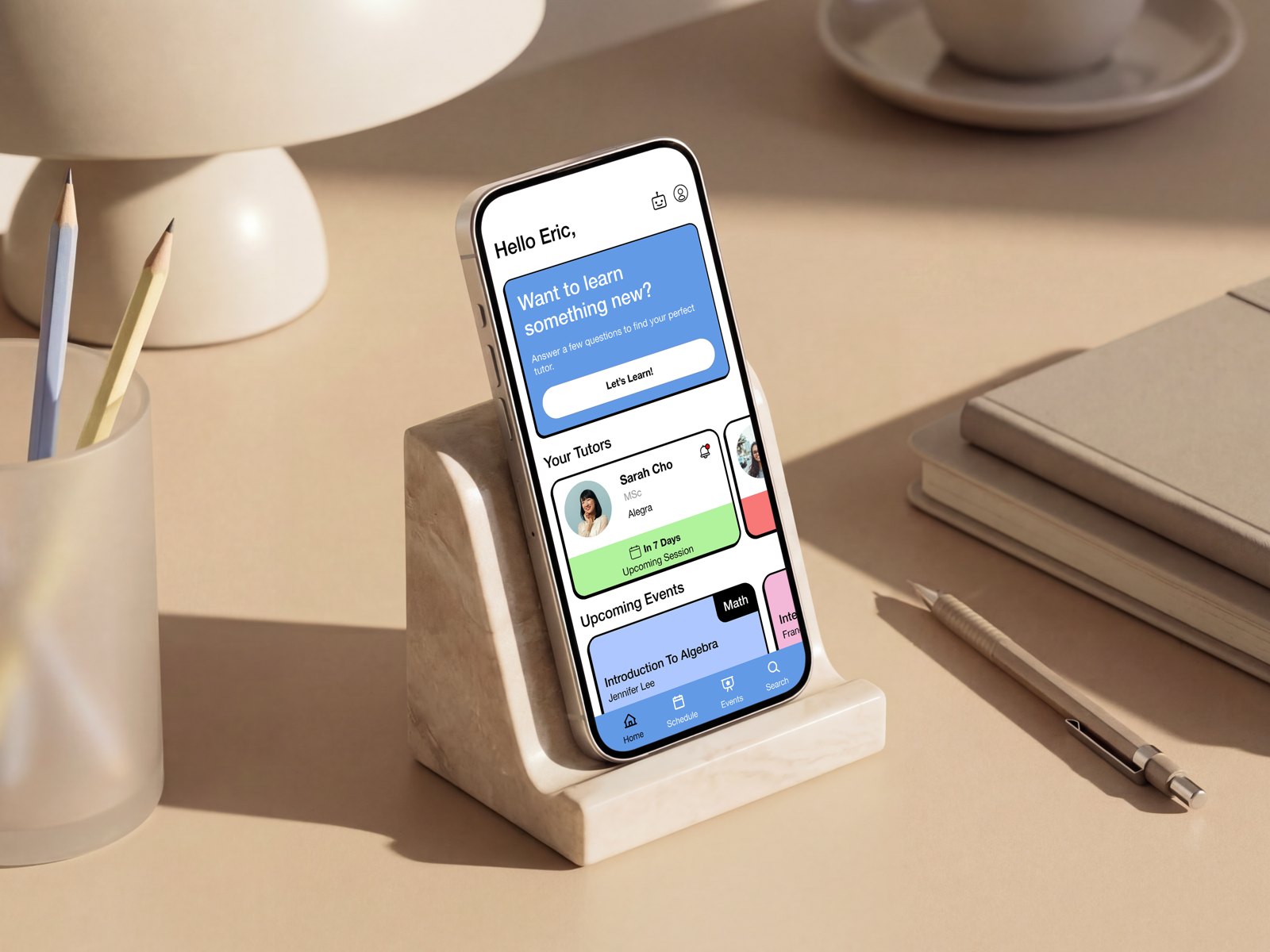
COT’s tutoring ran on intake forms and phone calls. We turned it into a self-serve app where learners sign up, get matched, book and prepay.
- Status
- MVP, in development
- Client
- COT, an online tutoring company (under NDA)
- My role
- UX research and product design; I owned payment and checkout
- Team
- Jr designer, Sr designer, the founder and COT’s engineering team
- Timeline
- 6 weeks
- Segment
- Learners: students and adult learners, with parents as the purchaser
- Tested with
- 4 participants, 100% task success
- North star
- Prepaid sessions booked in the app without staff help, and completed, per week
- Stack
- Figma, Notion
1. Background
COT is an online tutoring company that connects students and adult learners with professional tutors. It had a working website but no mobile app, and every new customer still went through a manual intake. We delivered a five-flow, high-fidelity prototype with annotations, handed off for development.
2. Project overview
Mission. COT gives students personalized one-on-one virtual tutoring from qualified educators, helping them build confidence and reach their academic potential.
The business problem. Before anyone could book, they filled in a form, waited for an internal review, then got on a live call. The founder said this was “leading to lost revenue from potential customers due to wait times,” and it tied staff time to every booking and reschedule. He wanted customers to book on their own, in an app built for actions, not reading.
Problem statement. Parents and adult learners struggle to find a tutor they trust who fits their goals, then hit friction scheduling, paying and communicating. The app had to cut the time from first contact to first booked session without losing the trust and tutor quality the manual process protected.
3. Ideation overview
Stakeholders. Weekly reviews with the founder to agree scope and priorities, and alignment with his engineering team on what could ship. The founder’s must-haves set the guardrails: onboarding, a dashboard, pricing and payment, session booking and events.
Scope. We built on an earlier team’s research and added our own in week one:
- 4 user interviews: a parent, a student, a teacher who tutors and a working professional upskilling
- 4 competitor apps reviewed by signing up and walking their flows (Wyzant, Kadama, Varsity Tutors, Chegg)
- AI-assisted secondary research on the tutoring market, then affinity mapping into themes
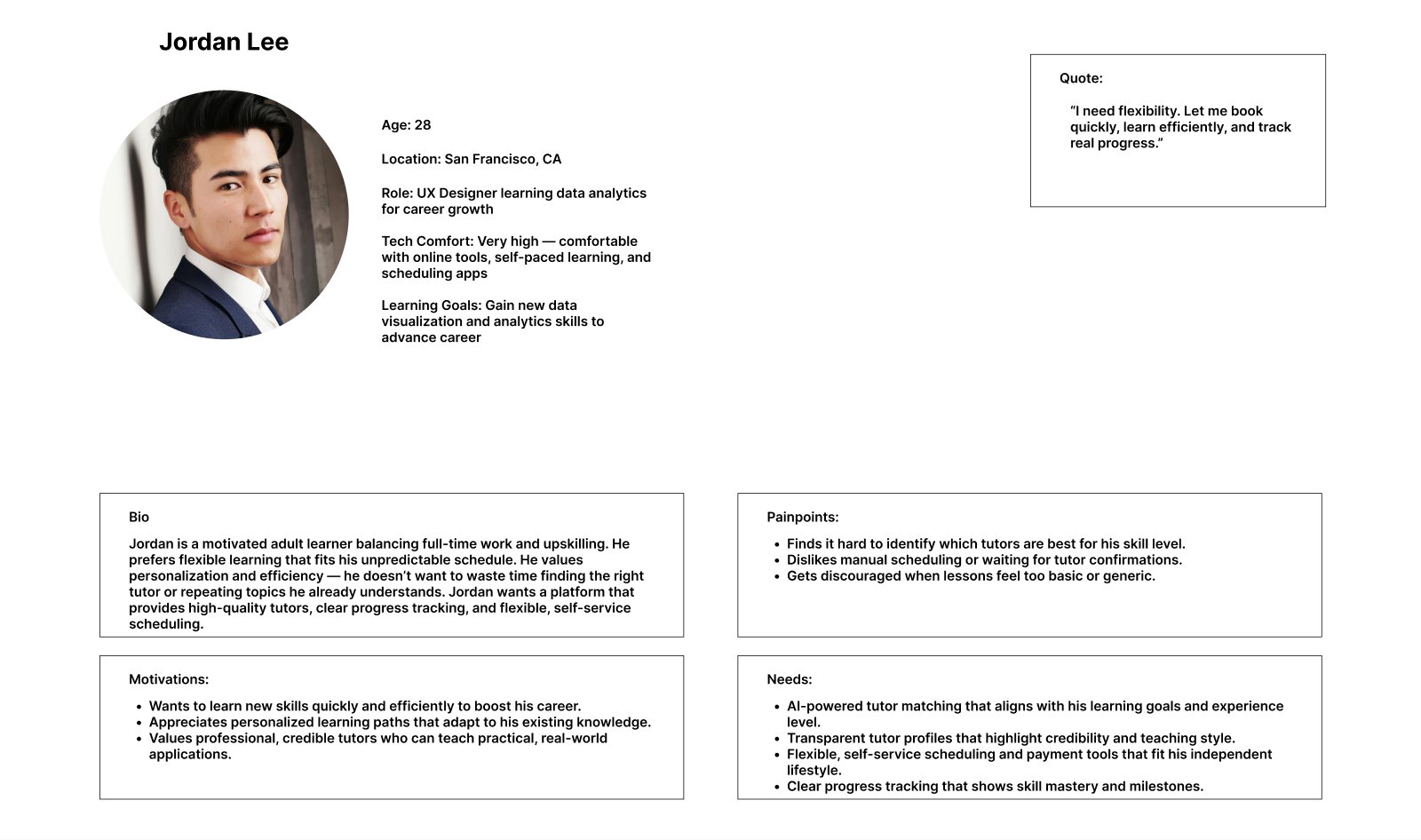
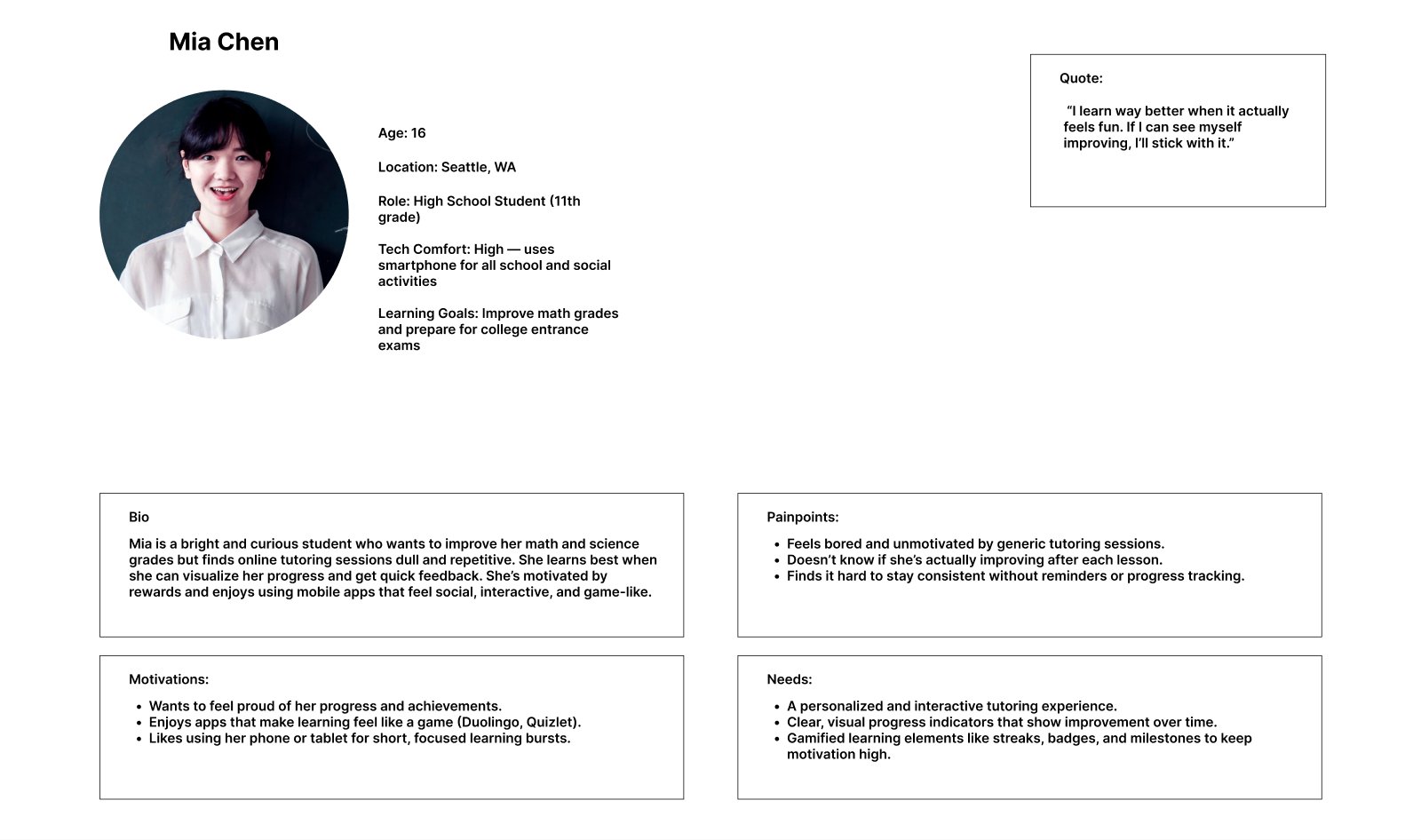
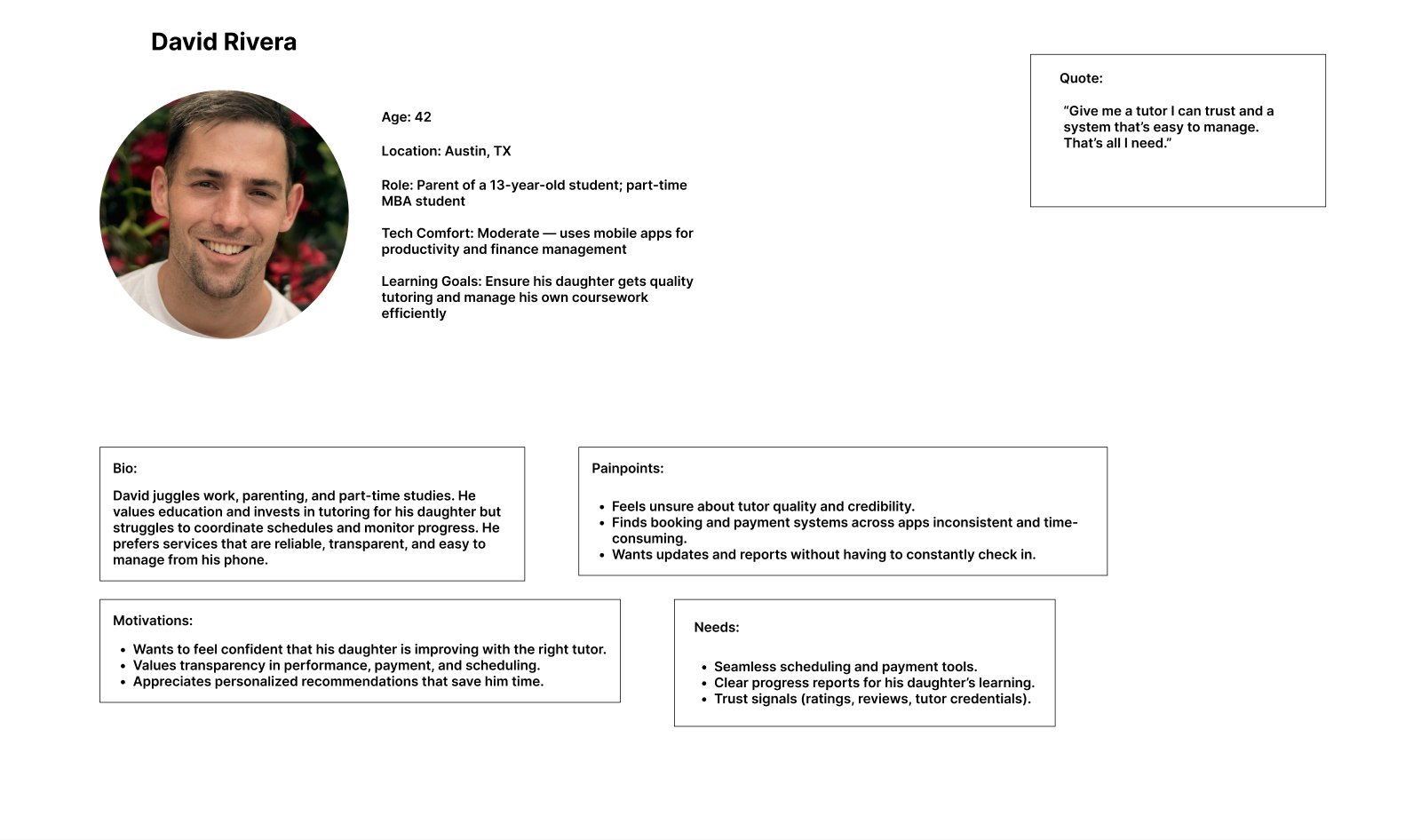
Target customer. Research produced four personas:
| Persona | Who they are | Key goal | Key frustration |
|---|---|---|---|
| Mia | Teen student | Fun learning and visible progress | Boredom, low motivation |
| Jordan | Adult learner upskilling for work | Efficient learning on a flexible schedule | Hard to find the right tutor; manual scheduling |
| David | Parent and decision-maker | Transparency, convenience, a tutor he trusts | Confusing scheduling; unclear progress |
| Sophia | Tutor | Professional growth, client retention | Fragmented tools, little visibility |
4. Customer segmentation
We prioritized learners: the students and adult learners who take the sessions. Parents stay in the picture as the purchaser.
| Segment | Impact | Urgency | Size of market | Total |
|---|---|---|---|---|
| Learners: students and adult learners | 4 | 5 | 4 | 13 |
| Tutors | 3 | 3 | 3 | 9 |
| Parents (as purchasers) | 3 | 2 | 3 | 8 |
Scored 1–5, retrospectively from research findings.
Learners feel the pain at every session and are most of the user base, so they shape the core flow: match, book, attend. Parents mostly enter at one moment, when they pay. That split shaped the MVP: matching and booking are built around the learner, and the checkout I owned is built for whoever holds the card. Tutors mattered for trust, so they appear through profile cards rather than a tutor-side app.
5. Customer pain point
We prioritized finding a tutor who fits, just ahead of booking and payment friction.
| Pain point | Impact | Urgency | Size | Total |
|---|---|---|---|---|
| Finding a tutor who fits my goals and learning style | 5 | 5 | 4 | 14 |
| Booking, rescheduling and paying without friction | 5 | 5 | 3 | 13 |
| Engaging learning with visible progress | 4 | 5 | 3 | 12 |
| Trusting tutor credibility | 4 | 5 | 3 | 12 |
| Separate learner and parent/admin views | 3 | 2 | 2 | 7 |
| Connecting with peer learners | 2 | 2 | 1 | 5 |
Scored 1–5, retrospectively from research findings.
Booking friction was the pain the founder felt most, and interviews backed it up: one parent had to phone in just to move a session, and when a tutor cancelled, her next session slipped a full week. But scoring changed the order. A smooth booking flow is worthless if the learner doesn’t trust the match, so matching came first, and booking and checkout followed from it.
6. Prioritized solution
We chose a matching questionnaire that leads straight to top-matched tutors and booking: the buildable first version of smart matching.
| Proposed solution | Ease (5 = easy) | Eng. effort (5 = easy) | Effectiveness | Total |
|---|---|---|---|---|
| Matching questionnaire → top-matched tutors → book or exit | 4 | 3 | 5 | 12 |
| Search and filter tutors by subject | 4 | 4 | 3 | 11 |
| Tutor profile cards with ratings and reviews | 3 | 3 | 4 | 10 |
| Personalized learning path and progress bar | 2 | 1 | 4 | 7 |
| AI-powered adaptive matching | 1 | 1 | 5 | 7 |
Scored retrospectively from the feature backlog, client meetings and research.
The questionnaire reuses the intake questions COT’s staff already asked on the phone, so it cuts the review-and-call wait without new data or infrastructure. AI matching would fit best long term, but needs session data COT doesn’t have yet. The questionnaire collects that data, which makes it AI matching’s first version. Search and profile cards stayed as supporting paths.
From 25 ideas to an 8-feature MVP. We ranked 25 features P1 to P5 with the founder. The final P1 set: sign-up and onboarding, matching and booking, search by subject, tutor profile cards, pricing and purchase, a learner/admin dashboard, events and an FAQ chatbot.
What we cut, and why
| Cut | Moved to | Reason |
|---|---|---|
| Learning progress bar | P2 | Engineering flagged it as hard to build; “progress” wasn’t defined yet |
| Badges and gamification | P2 | Retention play; no value before booking works |
| Session reminders, post-session summary | P2 | Rely on the core booking loop existing first |
| Study groups and community | P3 | Lowest-scoring pain |
| Peer rankings, sharing results | P4 | Lowest-scoring pain |
| In-app video, multiplayer study | P5 | High effort; outside the booking-first scope |
7. Develop MVP
The MVP is one continuous journey: sign up → get matched → book → pay → confirm, plus a chatbot and events to bring people back.
North star: prepaid sessions booked through the app without staff help, and completed, per week. It rewards what the founder cared about: customers booking on their own, fewer abandoned bookings, sessions paid in advance, and sessions that actually happen.
- Booking-flow completion rate, the inverse of abandonment
- Share of sessions paid with credit bundles rather than one at a time
- Reschedules handled in the app instead of by staff, a proxy for admin cost
- Post-session satisfaction score
COT had no in-house payment system, so booking and payment were designed to run on a third-party tool, which kept engineering scope small.
User stories and acceptance criteria
| # | User story | Acceptance criteria |
|---|---|---|
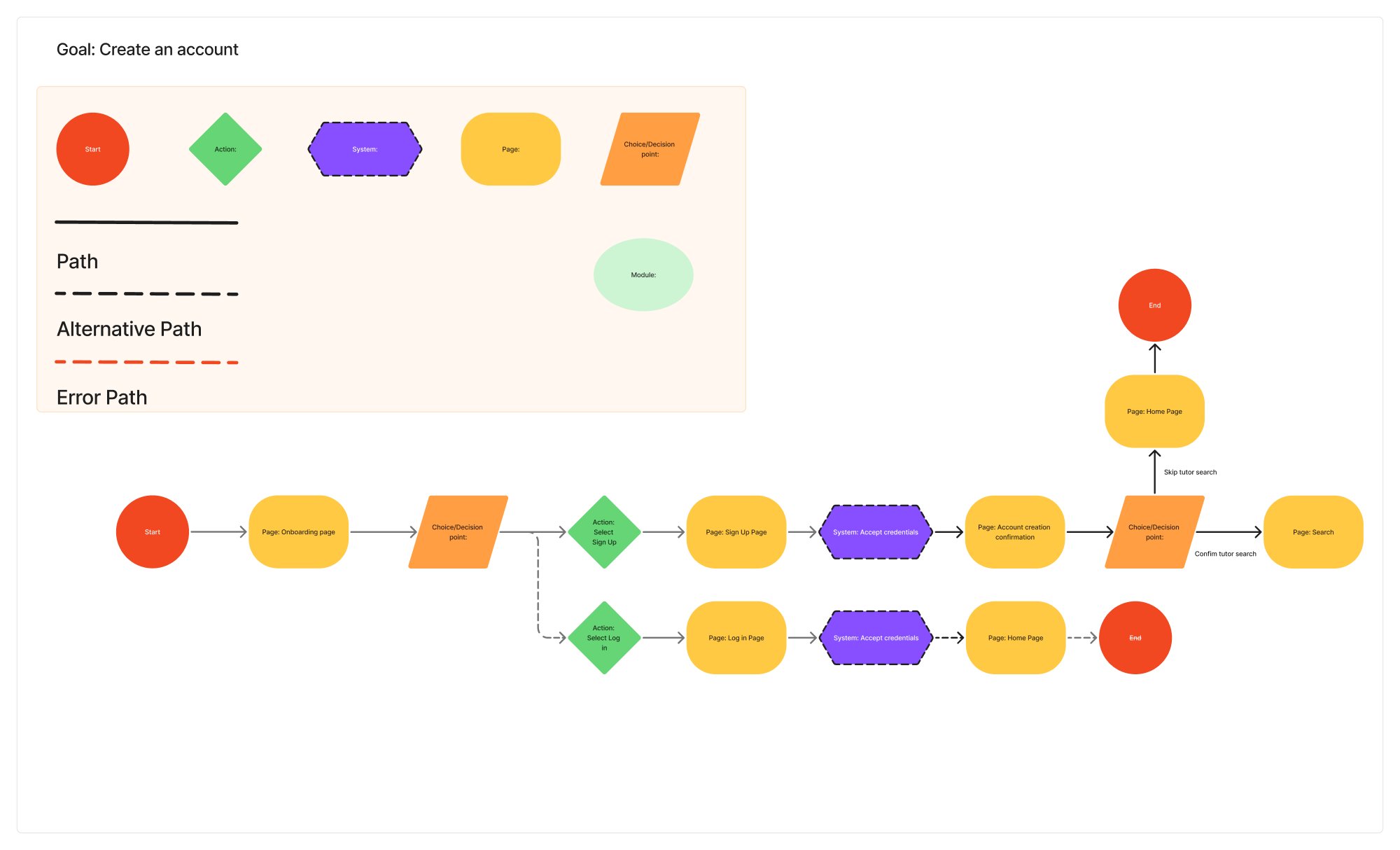
| 1 | As a new learner, I want to create an account in the app, so that I can book without calling anyone. | Sign up with email, Google or Apple. A first-time user lands on the matching questionnaire. |
| 2 | As a learner, I want to answer a few questions and see my best-matched tutors, so that I can choose with confidence. | Questionnaire mirrors COT’s intake questions. Results show profile cards with subjects and ratings. Book or exit at any point. |
| 3 | As a learner, I want to pick a time and add it to my calendar, so that I don’t miss the session. | Only available slots are shown. Confirmation appears immediately with add-to-calendar. |
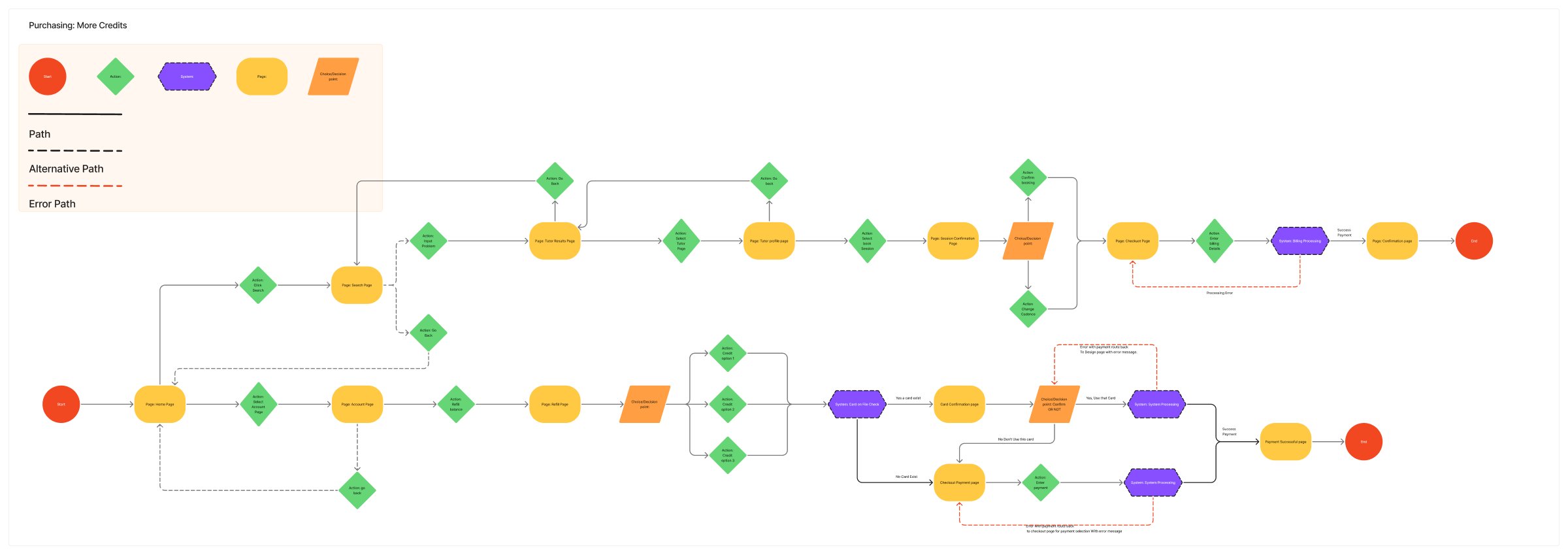
| 4 | As a parent or adult learner paying, I want to pay for one session or buy a discounted credit bundle, so that future bookings take one tap. (my flow) | One-off or bundle on one screen. Price and savings shown before paying. Mobile wallets supported. New balance on confirmation. |
| 5 | As a returning learner, I want to add sessions or top up credits from checkout, so that I can keep learning without starting over. (my flow) | Add sessions from the cart. Buy credits from the account page. Balance updates immediately. |
| 6 | As a learner, I want to see my upcoming sessions, so that I know what’s next. | Upcoming sessions listed on the dashboard; each opens to its details. |
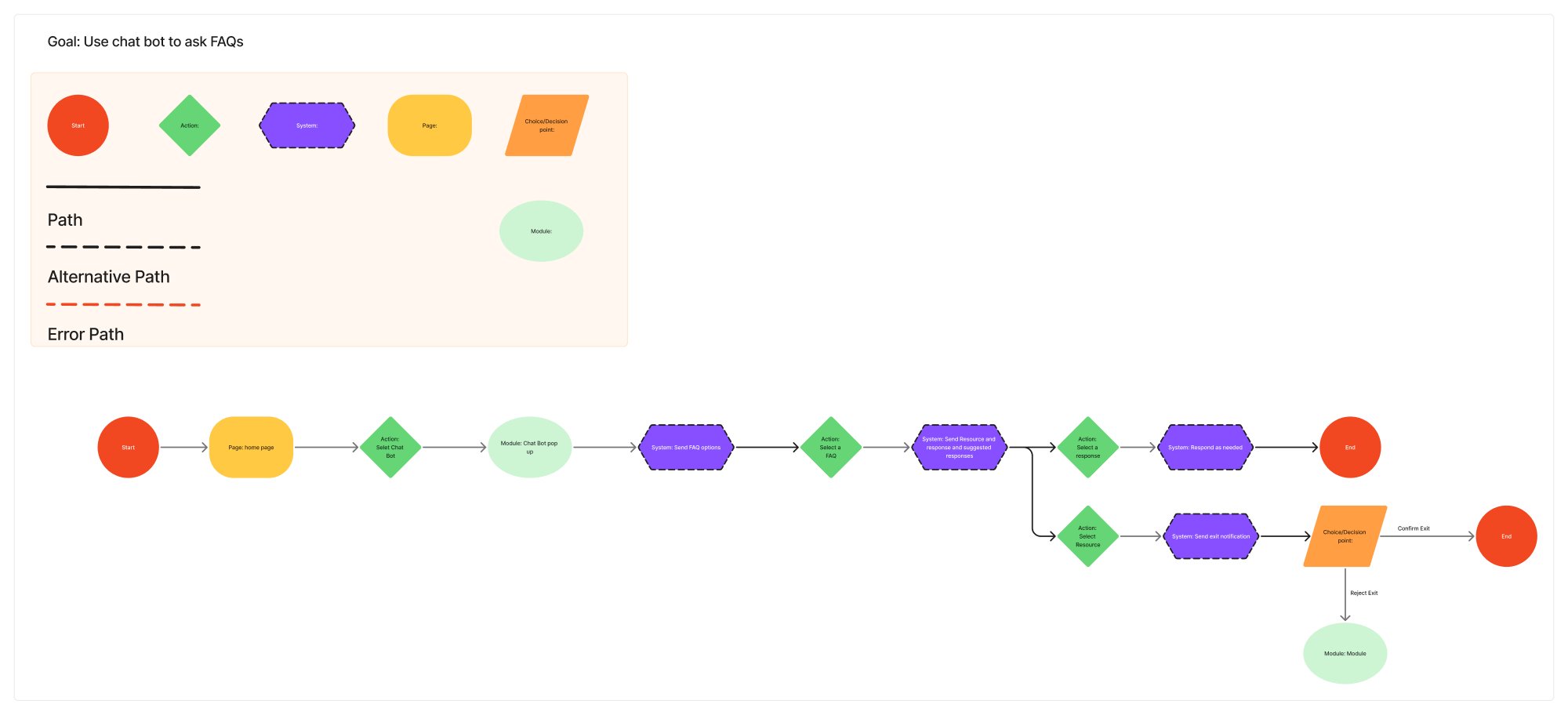
| 7 | As a learner, I want quick answers to common questions, so that I don’t have to wait for staff. | Chatbot answers from the FAQ library and links to a resource. |
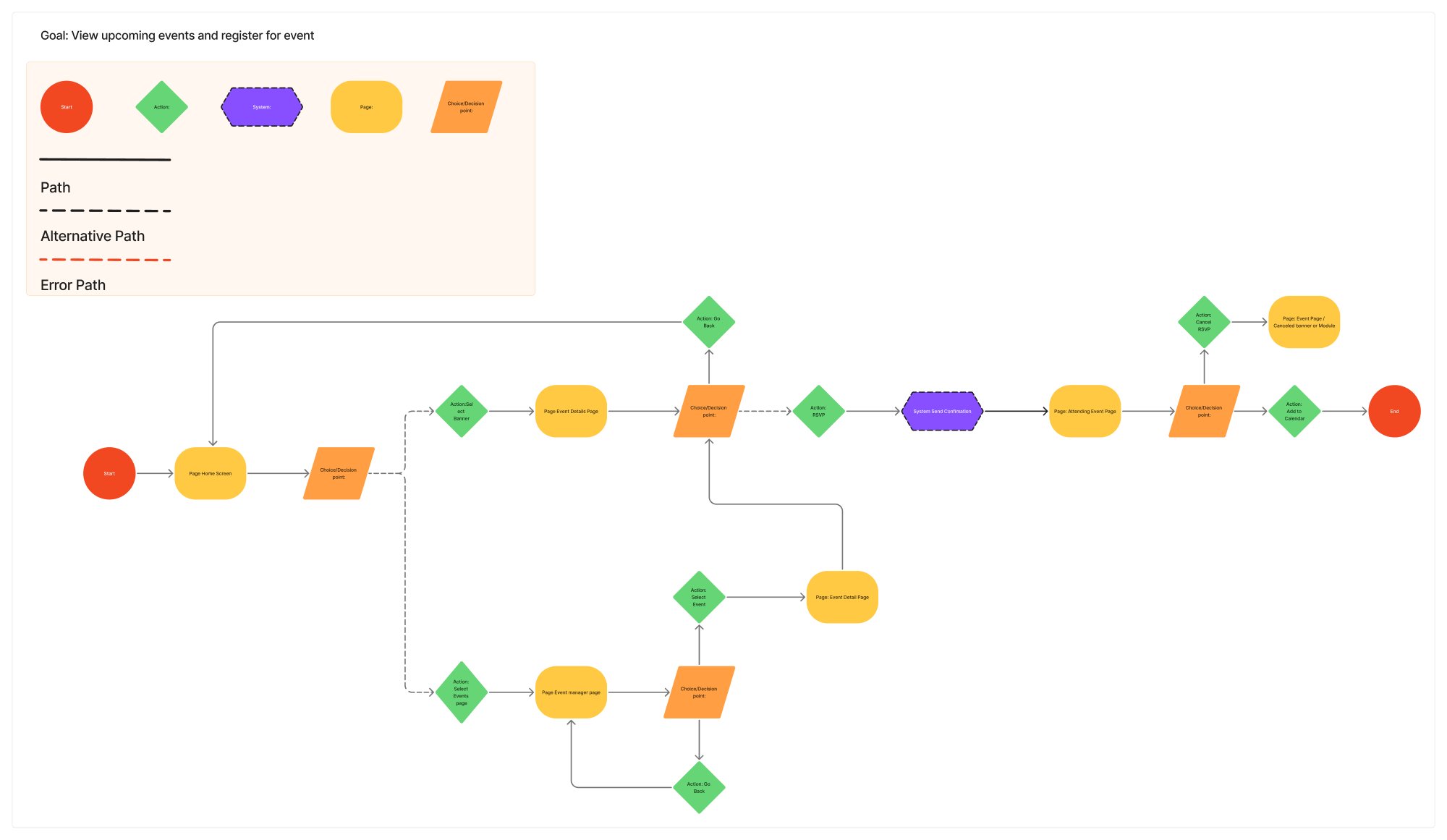
| 8 | As a learner or parent, I want to find and register for events, so that I can get more from COT. | Events appear on the dashboard. Registering saves the event to the calendar. |
Every story was held to the test plan’s bar: at least 90% task success, under 5 minutes per task, no critical errors.
User flows
Each flow maps the happy path, alternative paths and error paths. Select a flow to open it full size.
8. Launch plan
The app is in development and hasn’t launched yet, so this is the go-to-market plan we handed over, not a result.
- First market: existing customers who already book through the manual intake, mainly parents and adult learners. They already trust the service, so the app replaces a process instead of having to win them over.
- Target population: a closed beta of current active customers first, then every new inquiry from the website.
- Promotion: intake-form replies say “book instantly in the app,” an email to existing customers, and discounted credit bundles as the launch incentive. In-app events give people a reason to come back.
| Phase | What ships | Gate to move on |
|---|---|---|
| Closed beta | Existing customers: sign-up, matching, booking, credit bundles | Booking completion and payments hold |
| Open sign-up | All new website inquiries routed to the app | North star trending up |
| Extend | Chatbot questions shape tutor messaging; then reminders, session summaries, progress | Retention holds |
9. Customer feedback and iterations
All 4 usability test participants completed every task: 100% task success, beating our 90% bar. Participants had used or considered online tutoring, and worked through six tasks on the hi-fi prototype: book a tutor and add it to the calendar, ask the chatbot a question, view upcoming sessions, buy more credits, register for an event, and create an account.
Between low and high fidelity we iterated through weekly founder reviews, team critiques and mentor feedback, each round aiming for fewer steps from discovery to confirmation, clearer pricing and less to think about at checkout. Once the beta is live, the north star and its inputs replace task success as the bar.
Appendix: the full 25-feature backlog
All 25 ideas, ranked with the founder. Matching later moved to P1 and the chatbot replaced messaging in the final MVP.
| Priority | Feature | User need it serves |
|---|---|---|
| P1 | Sign-up and log-in onboarding | Founder must-have |
| P1 | Pricing and purchase page, with mobile wallet payment | Founder must-have |
| P1 | Learner/admin dashboard with an account-view toggle | Founder must-have |
| P1 | Events promoted in the dashboard | Founder must-have |
| P1 | Tutor search and filter by subject | Finding a tutor who fits |
| P1 | Tutor profile cards with ratings and reviews | Trusting tutor credibility |
| P1 | In-app messaging (replaced by the FAQ chatbot) | Connection and communication |
| P2 | Matching questionnaire and booking flow (moved to P1) | Finding a tutor who fits |
| P2 | Learning progress bar and personalized path | Finding a tutor who fits |
| P2 | Upcoming-session reminders and cancellation | Booking without friction |
| P2 | Post-session summary with billing status and review | Booking without friction |
| P2 | Badges and rewards | Engaging learning |
| P3 | Study sessions and student community | Peer connection |
| P3 | Homework and task list | Booking without friction |
| P4 | Ranking students with global peers | Peer connection |
| P4 | Share results | Peer connection |
| P4 | Competitive learning duels | Peer connection |
| P4 | Interactive lessons sent by tutors | Booking without friction |
| P5 | Tutor micro-learnings that inform the tutor | Finding a tutor who fits |
| P5 | Tutor-influenced micro-learning curriculum | Finding a tutor who fits |
| P5 | Tutor reliability metric made visible | Trusting tutor credibility |
| P5 | Etiquette guidance for tutors | Trusting tutor credibility |
| P5 | Profile display of performance | Peer connection |
| P5 | Multiplayer joint study | Engaging learning |
| P5 | In-app video call | Engaging learning |